

Apple Mail MCP





The only Apple Mail MCP server with full-text email search. Reliable on large mailboxes where other servers timeout — with 8 tools for reading, searching, and extracting email content.
Read the docs for the full guide.
Quick Start
pipx install apple-mail-mcp
Add to your MCP client:
{
  "mcpServers": {
    "mail": {
      "command": "apple-mail-mcp"
    }
  }
}
Build the Search Index (Recommended)
# Requires Full Disk Access for Terminal
# System Settings → Privacy & Security → Full Disk Access → Add Terminal

apple-mail-mcp index --verbose
Tools
| Tool | Purpose |
|---|---|
list_accounts() | List email accounts |
list_mailboxes(account?) | List mailboxes |
get_emails(filter?, limit?) | Get emails — all, unread, flagged, today, last_7_days |
get_email(message_id) | Get single email with full content + attachments |
search(query, scope?, before?, after?, highlight?) | Search — all, subject, sender, body, attachments |
get_email_links(message_id) | Extract links from an email |
get_email_attachment(message_id, filename) | Extract attachment content |
get_attachment(message_id, filename) | Deprecated — use get_email_attachment() |
Performance
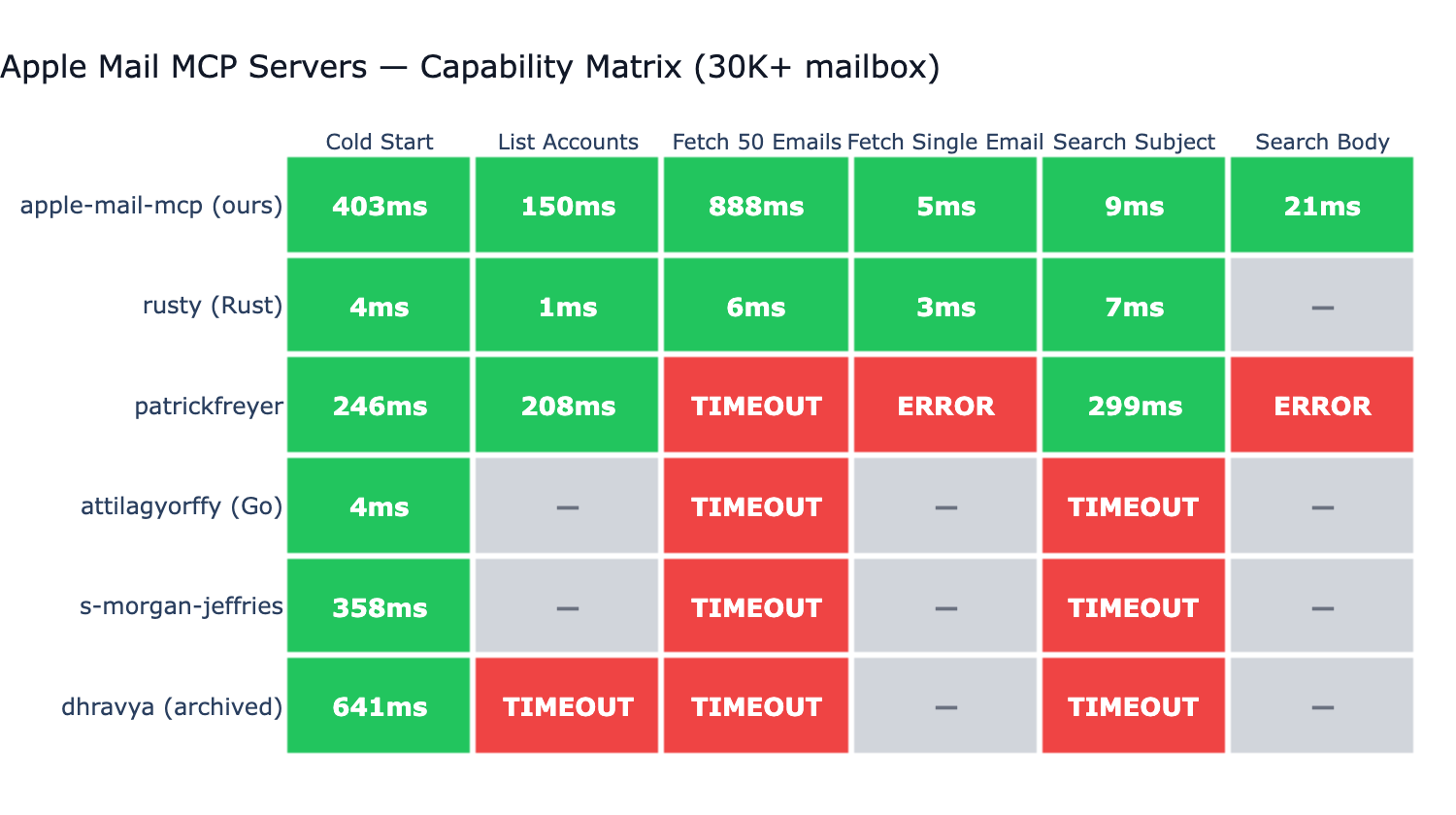
Tested against 6 other Apple Mail MCP servers on a 30K+ email mailbox:
- Only server that completes all operations without timing out
- Only server with full-text body search (FTS5 index, ~20ms)
- 5ms single email fetch via disk-first
.emlxreading - 7–9ms subject search via FTS5 (vs 230ms+ for AppleScript-based servers)
Configuration
| Variable | Default | Description |
|---|---|---|
APPLE_MAIL_DEFAULT_ACCOUNT | First account | Default email account |
APPLE_MAIL_DEFAULT_MAILBOX | INBOX | Default mailbox |
APPLE_MAIL_INDEX_PATH | ~/.apple-mail-mcp/index.db | Index location |
APPLE_MAIL_INDEX_MAX_EMAILS | 5000 | Max emails indexed per mailbox |
APPLE_MAIL_INDEX_EXCLUDE_MAILBOXES | Drafts | Mailboxes to skip in search |
APPLE_MAIL_READ_ONLY | false | Disable write operations |
{
  "mcpServers": {
    "mail": {
      "command": "apple-mail-mcp",
      "args": ["--watch"],
      "env": {
        "APPLE_MAIL_DEFAULT_ACCOUNT": "Work"
      }
    }
  }
}
CLI Usage
All tools are also available as standalone CLI commands (no MCP server needed):
apple-mail-mcp search "quarterly report" --scope subject
apple-mail-mcp search "invoice" --after 2026-01-01 --limit 10
apple-mail-mcp read 12345
apple-mail-mcp emails --filter unread --limit 10
apple-mail-mcp accounts
apple-mail-mcp mailboxes --account Work
apple-mail-mcp extract 12345 invoice.pdf
All commands output JSON. Generate a Claude Code skill for CLI-based access:
apple-mail-mcp integrate claude > ~/.claude/skills/apple-mail.md
Migrating from apple-mcp?
If you used supermemoryai/apple-mcp (archived January 2026), apple-mail-mcp is a maintained alternative for the Mail portion specifically. Notes, Messages, Contacts, Calendar, and Reminders are out of scope.
apple-mcp (mail tool, action) | apple-mail-mcp |
|---|---|
read_emails | get_emails(filter?, limit?) + get_email(message_id) |
search_emails | search(query, scope?) — 5 scopes: all, subject, sender, body, attachments |
send_email | Not yet supported (planned) |
What's different: available on PyPI (pipx install apple-mail-mcp), full-text body search via FTS5 (~20ms), disk-first single-email reads (~5ms), reliable on large mailboxes (30K+) where AppleScript-based servers timeout.
Development
git clone https://github.com/imdinu/apple-mail-mcp
cd apple-mail-mcp
uv sync
uv run ruff check src/
uv run pytest
License
GPL-3.0-or-later

